🎯
Spend Threshold Group Discounts
Reward customers with discounts when they spend a specific amount on targeted product groups
cart Difficulty: medium
Configuration
Download Config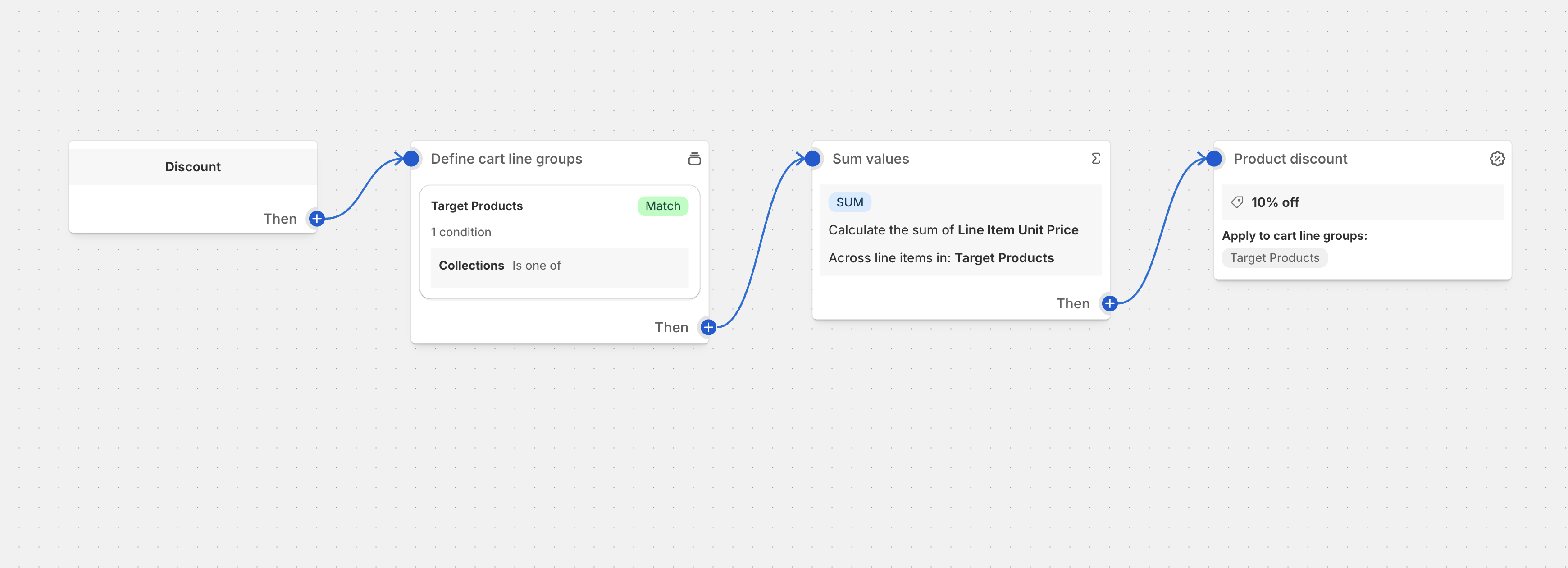
Overview
Spend threshold group discounts create targeted promotions that reward customers when they reach spending goals on specific product categories, brands, or collections. This strategy encourages focused spending while driving sales in specific product areas.
Common Use Cases
- Category Spending Goals: Spend $100 on electronics and get 15% off
- Brand Promotions: Spend $75 on premium brands and save $25
- Seasonal Collections: Spend $50 on summer items and get free shipping
- Cross-Sell Incentives: Spend $200 across kitchen products for a free accessory
- Bundle Thresholds: Spend $150 on home goods and get 20% off the entire category
Best Practices
- Group-Specific Progress: Show progress toward category spending goals
- Strategic Group Selection: Choose high-margin or slow-moving product groups
- Clear Group Messaging: Make it obvious which products qualify for the discount
- Visual Group Indicators: Highlight qualifying products in your store
- Category Cross-Promotion: Suggest products from the target group to reach threshold
Setup Instructions
- Identify target product groups with sales potential
- Set realistic spending thresholds based on group pricing
- Create product groups using Function Studio’s group builder
- Configure discount rules with group-specific conditions
- Set up progress indicators for the target groups
- Test threshold calculations and discount applications
Group-Based Pricing Strategy
Category Threshold Optimization
- Electronics: $100 threshold (average item $50-200)
- Apparel: $75 threshold (average item $25-75)
- Home Goods: $150 threshold (average item $30-100)
Smart Group Combinations
- Single Category Focus: All spending must be within one group
- Multi-Group Allowance: Spending can span related categories
- Brand-Specific Groups: Premium brands with higher thresholds
Dynamic Threshold Adjustments
- Seasonal Changes: Lower thresholds during slow seasons
- Inventory-Based: Reduce thresholds for overstocked items
- Competitive Response: Match competitor promotion thresholds
Display Components
Group-Specific Progress Bar

Smart Product Recommendations
Recommended Electronics to Reach $200:
• Bluetooth Speaker ($89) - Only $73 needed!
• Phone Case ($25) - Great add-on item
• Power Bank ($65) - Popular choice
Advanced Strategies
Category-Specific Promotions
- Electronics: Higher thresholds due to higher AOV
- Apparel: Lower thresholds with volume incentives
- Home & Garden: Seasonal threshold adjustments
- Beauty: Brand-specific group thresholds
Dynamic Group Management
- Smart Groups: Automatically update based on inventory levels
- Seasonal Groups: Create temporary groups for holidays/events
- Performance Groups: Focus on best-selling categories
- Clearance Groups: Lower thresholds for slow-moving inventory
Cross-Category Incentives
- Related Categories: Electronics + Accessories
- Complementary Groups: Kitchen + Dining
- Brand Collections: All products from specific vendors
Performance Metrics
Track these group-specific KPIs:
- Group-specific conversion rates
- Average spend per target group
- Threshold achievement rate by category
- Product recommendations click-through
- Category-specific revenue growth
- Customer journey completion rate
Ready to implement this discount?
Import this configuration into Function Studio and start offering this discount to your customers.