· Jonathan Sorenson · Shopify Functions · 15 min read
SupaEasy vs Function Studio: An Honest Comparison of Two Shopify Functions Apps (2026)
SupaEasy and Function Studio both let you build Shopify Functions without writing code, but they take different approaches. Here's a side-by-side look at how you build, what each covers, pricing, support and reviews, including where SupaEasy is the better pick.
Disclosure: Function Studio is our product. We wrote this comparison to be useful to merchants choosing between the two apps. Everything we say about SupaEasy comes from its public App Store listing, website and help center, checked between October 14 and 16, 2026. Both apps ship updates often, so check the current listings before you decide. If anything here is out of date, tell us and we’ll correct it.
The short version
SupaEasy (by Nextools) has been on the market since 2023. It has an excellent reputation and gives you several ways to create functions: presets, a wizard, an AI generator, a JavaScript editor, a new visual Flow builder and, on its top plan, custom apps built for you.
Function Studio (by EasyLogicTools) launched in 2025. It is built around one idea: every function is a visual flow. Discounts, bundles, validations, payment and delivery rules, and cart transforms all use the same canvas. It also adds an on-site promotions layer: in-cart upsells, gift selectors and a visual widget editor.
| SupaEasy | Function Studio | |
|---|---|---|
| Developer | Nextools | EasyLogicTools |
| On the App Store since | May 2023 | May 2025 |
| Built for Shopify | Yes | Yes |
| Rating | 5.0 from 235 reviews | 4.9 from 20 reviews |
| Main way to build | Presets, wizard, AI generator, code editor, Flow (new) | Visual flow builder with an AI assistant |
| AI | AI generator from Advanced ($99), billed in credit packs | AI assistant included from Standard ($39), no credits to buy |
| AI tools outside the app | Not documented (REST API for automation tools on every plan) | MCP server for Claude, Codex and other MCP clients (Standard and up) |
| Paid plans | $49 / $99 / $399 per month | $39 / $69 / $199 per month |
| Free plan | Development stores | Development stores |
How you build functions
This is the biggest difference between the two apps.
SupaEasy: many paths to a function
SupaEasy gives you several ways to create a function, and you choose based on how complex the logic is:
- Presets and templates for common discounts and payment, delivery and validation rules.
- A Functions Wizard and an AI Functions Generator, both on the Advanced plan. AI usage is billed through credit packs ($25 for 50 credits, up to $149 for 500).
- A JavaScript function editor for writing custom logic. On the Ultimate plan, SupaStudio supports Rust, JavaScript and AssemblyScript and deploys custom apps across several stores.
- SupaEasy Flow, a newer node-based canvas with Condition, Switch, Filter and Result nodes. According to the help center, a flow ends in one of four results: discount, delivery, payment or validation. It also has logs, import and export, and a complexity check.
The Flow builder is recent: its help articles were last updated in the past month. They show comparisons such as “greater than” and “contains” on cart, customer, market and address data. We couldn’t find documentation of AND/OR groups, aggregations or cart transforms inside Flow. If you need those, check in the app, or use SupaEasy’s AI, code or custom development options.
Function Studio: one visual canvas for everything
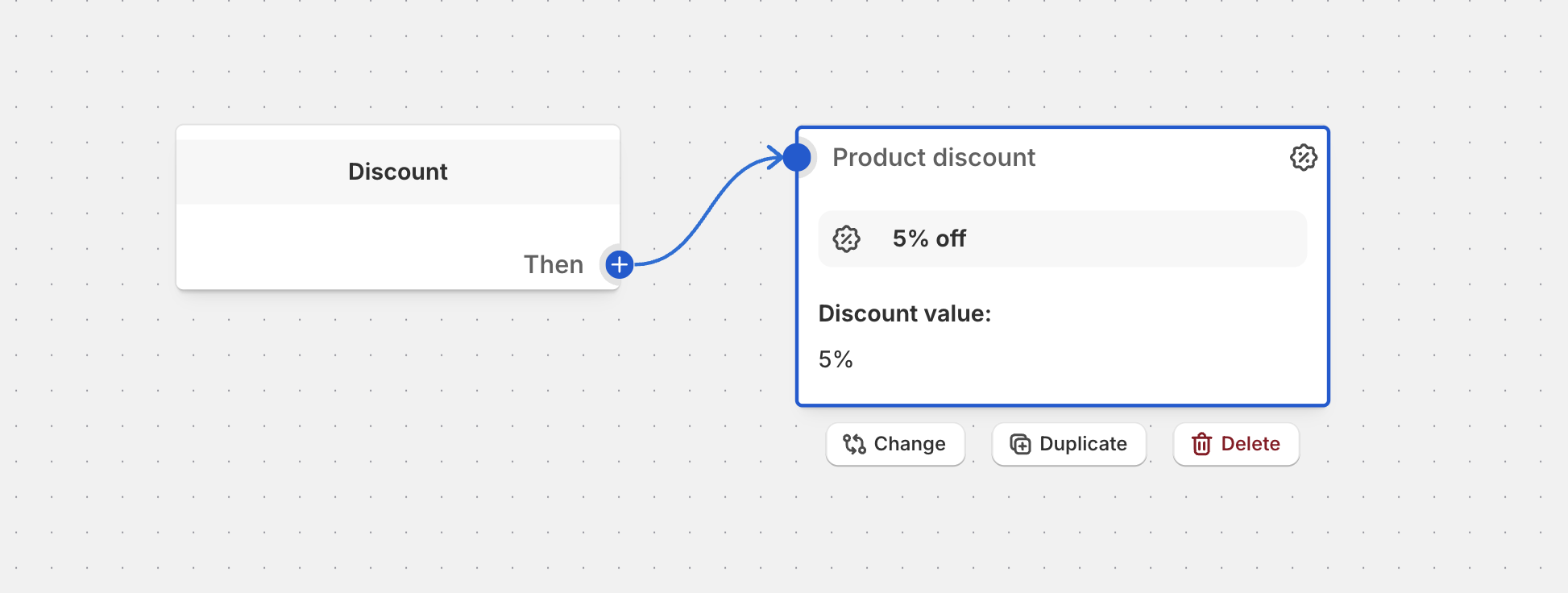
In Function Studio, every function is a flow. You start from the function block (Discount, Payment customization, Validation and so on) and connect conditions and actions to it:
The same canvas handles both simple and complex logic.
Built-in blocks for complex discounts
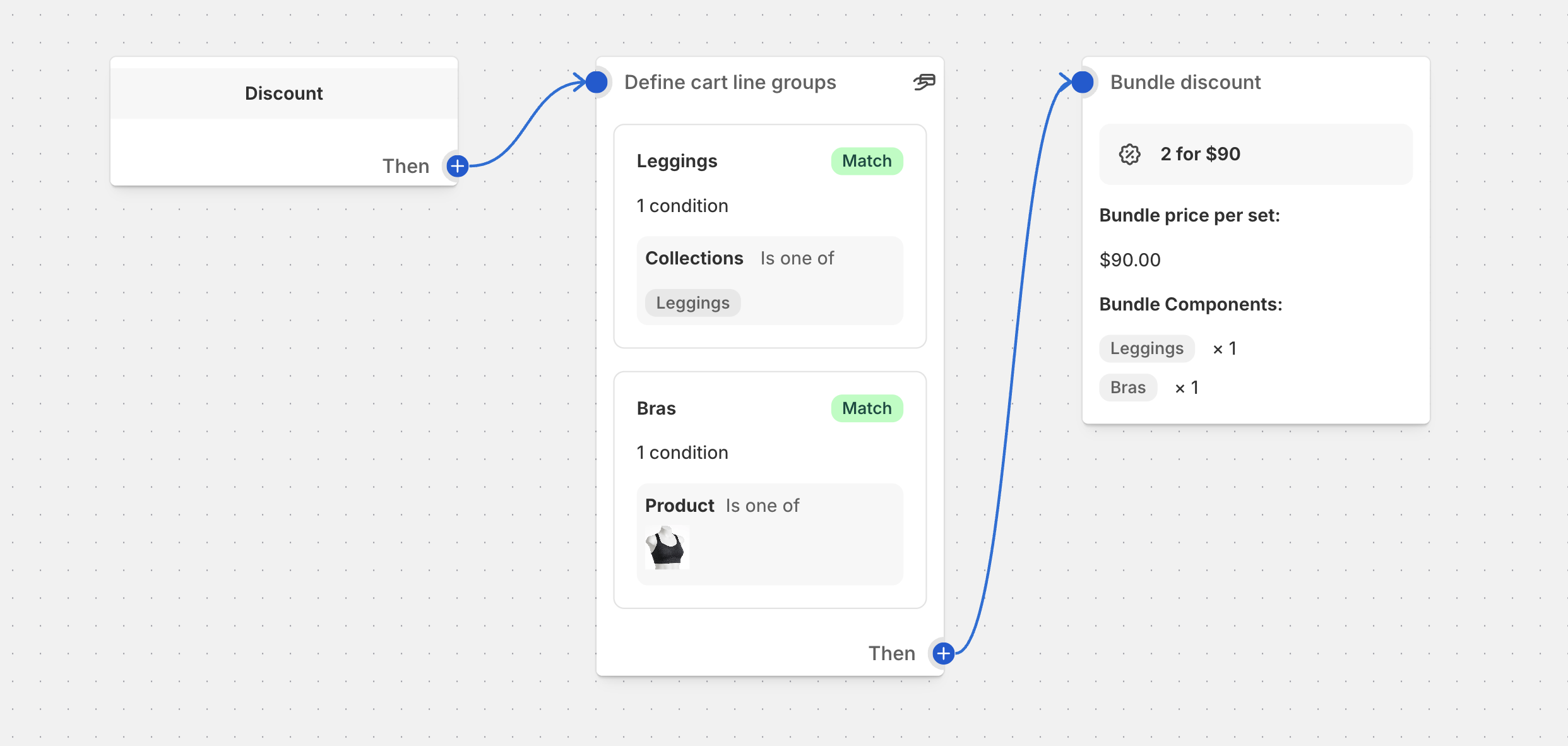
Function Studio’s main difference is its library of ready-made blocks for logic that usually needs custom code. You combine them on the canvas instead of writing a function:
- Line groups filter cart lines by product, collection, tag, price, metafield or line item property. A group can build on another group, exclude one, cap how many items it holds, and set the order of its items.
- Aggregation blocks (Count Items, Sum Values, Max) work across groups. For example: “count items from the Sale collection” or “add up the price of items in the bundle group”.
- Calculated fields, such as the cart subtotal after other discounts, let you set gift and spend thresholds correctly when several discounts stack.
- Bundle, tier and Free Gift blocks package common patterns: fixed-price and component bundles, quantity and spend tiers, and gift-with-purchase rules.
Data-driven logic: metafields, cart attributes and line item properties
Function Studio can use your store data in two ways: as conditions and as values inside the discount itself.
- Conditions can check product, variant and customer metafields, cart attributes (including JSON attributes and UTM parameters) and line item properties. Example: “only customers whose
loyalty.tiermetafield is Gold”. - Linked fields let any discount value, quantity, message or tier threshold come from a metafield, cart attribute, line item property or the output of an upstream block. You don’t type in a fixed number. This allows:
- Per-product discounts: each product stores its own percentage or flash-sale price in a metafield.
- Custom base pricing: discounts calculated from a wholesale or compare-at price instead of the regular price.
- App-driven discounts: a bundle builder or product customizer writes a line property, and the discount reads it.
- Computed discounts: a Count or Sum block feeds its result straight into the discount value.
JSON metafields are supported down to individual subfields, and the metafield discount docs cover how values resolve per cart line. Metafield support and JSON cart attributes are part of the Advanced plan.
Expressions and testing
Expressions handle cases where a dropdown isn’t enough. You build them in a visual expression editor:
- Bundle blocks cover fixed-price bundles, component bundles and collection bundles:
An in-app cart tester runs a flow against a real cart before you activate it. It traces each condition, so you can see why a discount did or didn’t apply. An AI assistant is included from the Standard plan ($39 per month), with no credits to buy. Describe a promotion in plain language and it builds or edits the flow for you. SupaEasy’s AI generator, by comparison, starts on its $99 Advanced plan and is billed through credit packs. Function Studio has no code editor, so if you want to write JavaScript or Rust yourself, SupaEasy is the better fit.
Compiled Rust for fast checkouts
Every Function Studio function runs as compiled Rust. Your flow is configuration that Rust functions read; it isn’t turned into JavaScript. This matters because functions run during cart and checkout, often several per request. Shopify’s Optimize instruction counts guide explains:
- Instructions add latency: every WebAssembly instruction a function executes adds latency for the buyer.
- JavaScript is interpreted: JavaScript functions run on an embedded JavaScript engine, so they execute significantly more instructions than equivalent Rust.
- Rust has the biggest impact: moving to Rust is usually the single biggest way to cut a function’s instruction count. Shopify’s language guide recommends Rust for public apps, large carts and complex logic, to stay within Shopify’s instruction limits.
In practice, that means fast discount evaluation at checkout and room for complex logic: big carts, many line groups, stacked tiers and bundles. It also means fewer surprises during traffic spikes such as Black Friday. SupaEasy doesn’t publish which language its preset and Flow functions use. Its custom-code editor is JavaScript, and SupaStudio on the Ultimate plan adds Rust.
Working from Claude, Codex and other AI tools: the MCP server
Function Studio also runs a remote MCP server (Model Context Protocol). You can connect Claude, Codex or any other MCP client and manage functions from there. You describe what you want, and the AI:
- searches your catalog for the right products,
- builds the flow,
- tests it against a sample cart,
- saves it as an inactive draft.
You then review and activate it in the app. Promotions, scheduling and promotion analytics are covered too.
For example, we asked Claude: “create new bundle discount: 3 x coffee beans => $15; 2 x kettle => $70; kettle + glass set + coffee beans = $60”. It created one draft discount with three fixed-price bundles. Then it tested a cart with 4 beans, 3 kettles and a glass set: the total came to $145 ($60 + $15 + $70), with the leftover bean at full price. This is the flow it saved:
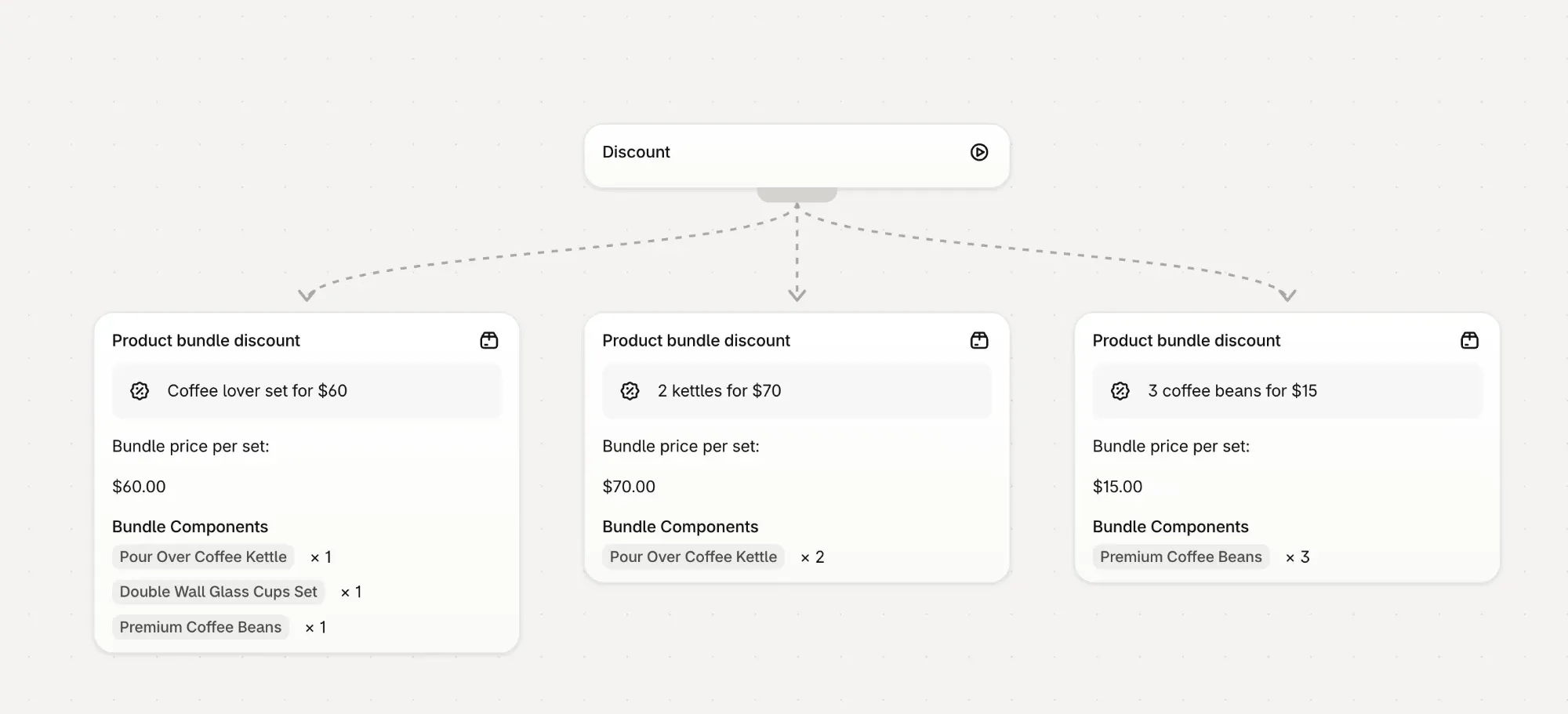
You choose the permissions when you connect: read, create and edit drafts, activate and schedule, promotions and analytics. Activation tools ask for confirmation in the AI client. Each connection is tied to one staff account, and the app keeps a log of every call with a revoke button. The MCP server is included from the Standard plan.
We couldn’t find an MCP server in SupaEasy’s documentation. Its AI generator runs inside the app on the Advanced plan. SupaEasy does offer a REST External API on every plan. It’s built for automation tools such as Zapier, Make and n8n, and comes with an OpenAPI specification and an in-app API playground.
What each app can build
| Shopify Function area | SupaEasy | Function Studio |
|---|---|---|
| Product, order and shipping discounts | Yes | Yes |
| Tiered, volume, BOGO, Buy X Get Y | Yes | Yes |
| Bundle discounts (incl. fixed final price) | Yes (listed) | Yes, dedicated bundle blocks |
| Discount code rejection and bulk codes | Bulk codes documented | Yes, with wildcard rejection rules (unlimited bulk codes on Plus) |
| Payment customizations (hide, reorder, rename) | Yes | Yes |
| B2B payment terms | Not documented | Yes (net terms, fixed dates, deposits) |
| Delivery customizations (hide, reorder, rename) | Yes | Yes |
| Cart and checkout validation | Yes (Premium and up) | Yes |
| Cart transforms (expand, merge, update lines) | Not documented | Yes, as flow blocks |
| Conditions on metafields | Not documented | Yes (product, variant, customer) |
| Conditions on cart attributes | Yes (“Cart has Attribute”) | Yes, including JSON attributes |
| Conditions on line item properties | Not documented (pairs with the separate AttributePro app) | Yes |
| Discount values from metafields, attributes or properties | Not documented | Yes, using linked fields |
| Aggregations (count, sum, max) as blocks | Not documented | Yes |
| Version history and restore | Not documented (flow import and export) | Yes, Timeline with restore (Advanced and up) |
| Upsells, gift selector and auto-add in the same app | No, separate paid apps | Yes (Advanced) |
| Function runtime | Not published (custom code editor is JavaScript; Rust via SupaStudio on Ultimate) | Compiled Rust (WebAssembly) for every function |
| MCP server for AI clients (Claude, Codex and others) | Not documented | Yes (Standard and up) |
| REST API for automation tools (Zapier, Make, n8n) | Yes, External API on every plan | Not documented |
| Custom code (JavaScript / Rust) | Yes | No |
Both apps cover the core discount, payment, delivery and validation APIs. SupaEasy’s strength is its several ways to build. Function Studio’s documented advantages are its built-in blocks for complex logic, data-driven discounts based on metafields, cart attributes and line item properties, and cart transforms and B2B payment terms as flow blocks. SupaEasy’s Advanced plan lists “All Shopify Functions”, so cart transforms may be available there, but its help center doesn’t document them. The cart transform example below expands a bundle product into its components in the cart:

Storefront and checkout promotions: one app or several
Discounts are only half of a promotion. Shoppers also need to see the offer, and this is where the two apps differ most in total cost.
SupaEasy builds functions. The shopper-facing parts come from separate Nextools apps, each with its own subscription:
- SupaElements (listing) adds checkout, thank-you and order-status page elements. It costs $29 or $49 per month on its own, is 50% off with SupaEasy Premium, and is free with SupaEasy Advanced ($99) and above.
- AutoCart (listing) adds gifts and other products to the cart automatically. It costs $5.99–$12.99 per month; automatic gift discounts and progressive gifts start on its $8.99 plan.
- In-cart upsells in the cart drawer aren’t covered by either app, so you’d need a cart or upsell app. SupaEasy lists Rebuy as an integration.
Function Studio builds all of this into the same app on the Advanced plan, at no extra cost:
- In-cart upsells, plus Upsell Buttons on product pages, with an optional discount on the add-on.
- Gift with purchase: a gift selector where shoppers pick a free gift, with automatic add and removal.
- A visual widget editor: drag-and-drop building blocks, layouts and color themes for storefront and checkout.
- Per-promotion analytics: views, clicks, adds, orders and AOV lift.
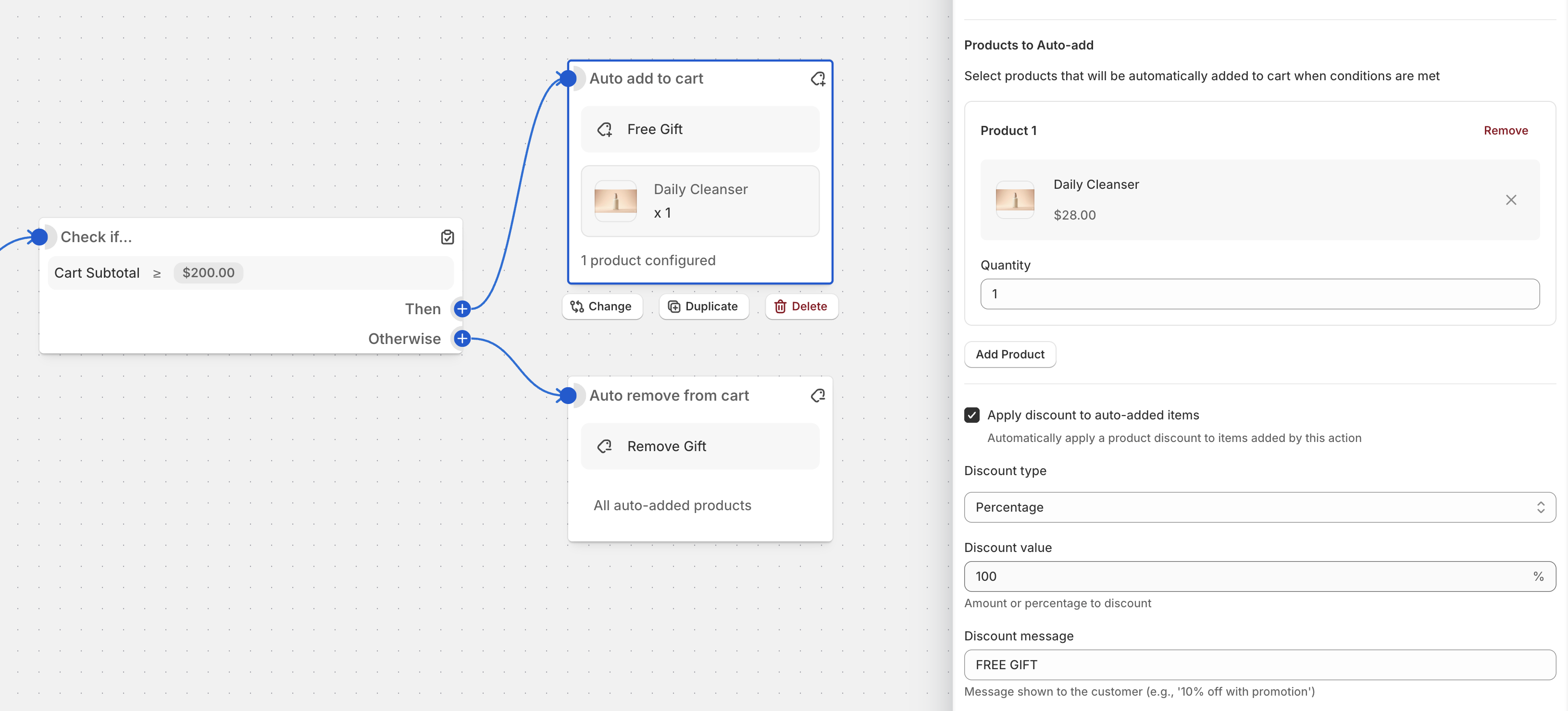
Here is the monthly cost of one common setup: tiered discounts plus a gift with purchase that is auto-added and shown at checkout. List prices, mid-October 2026:
| Setup | SupaEasy + companion apps | Function Studio |
|---|---|---|
| Discounts, checkout elements, auto-added gifts | Premium $49 + SupaElements Advanced $24.50 (50% off) + AutoCart $8.99 = $82.49 | Advanced $69 |
| The same, on SupaEasy’s plan that includes SupaElements | Advanced $99 + AutoCart $8.99 = $107.99 | Advanced $69 |
| Plus in-cart upsells | Add a third-party cart or upsell app | Included |
Each extra app also means another install, another settings screen, another support contact and another script on your storefront. If you already pay for a cart or upsell app you like, this matters less. If you want the discount logic and the widget that promotes it in one place, with one bill, Function Studio has a clear advantage.
Maintaining functions yourself
Promotions change every week, so it’s worth asking who edits the logic after it’s built.
With SupaEasy, simple rules stay in presets, the wizard or Flow. More complex cases go to the AI generator (paid per credit), the JavaScript editor, or a custom app that Nextools builds for you on the $399 Ultimate plan. All of those work, but the result is code. Changing it later means reading that code, generating it again, or asking the vendor.
With Function Studio, complex logic stays on the same visual canvas as simple logic, so the people running promotions can change it themselves:
- Readable logic: conditions, groups and discounts are blocks you can follow on the canvas, not generated code.
- Form view: pin key blocks, such as a threshold or a discount percentage, so teammates can edit them as simple form fields without opening the flow editor. Block descriptions explain what each one does.
- Cart tester with tracing: check a change against a real cart, and see which condition passed or failed, before it goes live.
- Version history: every change is recorded in a Timeline across all functions and promotions. You can see what changed and when, and restore an earlier version if a change goes wrong. It’s included from the Advanced plan, and Plus adds advanced function versioning.
SupaEasy’s help center documents import and export of flows, but we couldn’t find a version history or restore feature. If your own team will maintain the logic, rather than a developer or the vendor, Function Studio is the stronger fit.
Migrating from Shopify Scripts
Neither app promises fully automatic conversion of Ruby Scripts into Functions.
- SupaEasy started as “Script Migrator”. It offers a Scripts Editor and AI-assisted generation on Advanced, and migration consulting on Ultimate. Its migration FAQ says logic is recreated manually.
- Function Studio rebuilds Scripts as visual flows. The rebuilt logic lives on the canvas, and you can run it through the cart tester before activating it. The Plus plan includes hands-on migration help from the team.
Pricing
As listed on the Shopify App Store in mid-October 2026 (USD per month):
| SupaEasy | Function Studio | |
|---|---|---|
| Free | Development stores | Development stores |
| Entry plan | Premium $49: checkout and validation customizations, templates, live chat | Standard $39: flow builder, validations, payment and delivery, tiered/BOGO/bundle discounts, GWP, cart transforms, AI assistant |
| Mid plan | Advanced $99: wizard, AI generator (credits extra), Scripts Editor, all functions, SupaElements | Advanced $69: metafields, expressions, translations, POS features, cart tester, currency conversion, storefront and checkout promotions |
| Top plan | Ultimate $399: SupaStudio, a custom app built for you, consulting | Plus $199: function versioning, Scripts migration help, dedicated developer, partner Slack |
| Trial | 7 days | 3 days on Standard, 5 on Advanced, 7 on Plus |
SupaEasy’s help center also mentions a $29 Starter plan that includes Flow. It doesn’t appear on the App Store pricing table, so check inside the app.
List prices are lower on Function Studio at each tier, but the plans don’t map one-to-one. Function Studio’s metafields, expressions, cart tester, live chat and storefront promotions are on its $69 Advanced plan, $20 more than SupaEasy’s $49 entry plan. Function Studio’s Standard plan includes the gift-with-purchase discount logic; the gift selector shoppers see needs Advanced. Advanced also lists a limit of 25 active functions. SupaEasy’s Ultimate plan includes things Function Studio doesn’t sell, such as custom apps built and hosted for you. AI is priced differently too. SupaEasy’s AI generator starts on its $99 Advanced plan and uses credit packs ($25 for 50 credits up to $149 for 500). Function Studio’s AI assistant is included in the subscription from the $39 Standard plan, with no separate credits to buy.
Which one should you choose?
SupaEasy is likely the better fit if:
- You or your developer want to write code (JavaScript, Rust) or use an AI generator for one-off functions.
- Your rules depend on B2B companies, markets, selling plans or postal codes, which are all covered by its condition library.
- You want a vendor to build and host a custom app for you (Ultimate).
- You value a long, proven track record at large scale, live chat on the entry plan and a 7-day trial on every paid plan.
- You already use or want its companion apps. SupaElements, for checkout UI, is free on Advanced and above.
- You want to automate functions from Zapier, Make, n8n or your own systems through a REST API that is included on every plan.
Function Studio is likely the better fit if:
- You want to build and maintain complex logic visually without code, including tiers, bundles, line groups, aggregations and expressions.
- Your discounts depend on store data: metafields, cart attributes or line item properties as conditions, or as the source of the discount value itself.
- You need cart transforms or B2B payment terms alongside discounts.
- You want an all-in-one app: upsells, gift selectors, auto-add, checkout widgets and promotion analytics in the same app and subscription as your discount logic, with no companion apps to pay for.
- Your own team will maintain the functions: logic stays visual, teammates can edit pinned blocks in Form view, and version history lets you restore any earlier version.
- You want an AI assistant included from the $39 Standard plan, with no credit packs to buy.
- You want to work from Claude, Codex or another AI client: the MCP server builds and tests functions and saves them as inactive drafts for you to approve in the app.
- Checkout speed matters, especially with large carts or complex rules: every function runs as compiled Rust, the language Shopify recommends for performance.
- Price matters: list prices are lower at each tier, starting at $39 per month.
Both apps have free plans for development stores, so the best test is to build the same promotion in each and compare. You can install Function Studio to start.