· Jonathan Sorenson · Shopify Functions · 16 min read
SMART Functions Creator vs Function Studio: A Comparison of Two Shopify Functions Apps (2026)
SMART Functions Creator and Function Studio both build Shopify Functions from line groups, without code. Here's how they compare on building rules, data-driven discounts, testing, storefront promotions, support, pricing and reviews, including where SMART Functions Creator is the better pick.
Disclosure: Function Studio is our product. We wrote this comparison to be useful to merchants choosing between the two apps. Everything we say about SMART Functions Creator comes from its public App Store listing, website and help center, checked on October 21, 2026. The app was earlier listed as “FC Scripts & Functions Creator”. Both apps ship updates often, so check the current listings before you decide. If anything here is out of date, tell us and we’ll correct it.
The short version
SMART Functions Creator (by E-TRADE PARTNER, a Warsaw-based company that makes several SMART apps) launched in June 2025. It has a 5.0 rating from 141 reviews, none below four stars, and a simple promise: replace Shopify Scripts with no-code rules, at a low price, with a support team that often builds the rules for you. Its help center is unusually clear about what the app does not do.
Function Studio (by EasyLogicTools) launched in May 2025. Every function is a visual flow. Discounts, bundles, validations, payment and delivery rules, and cart transforms all use the same canvas. It adds data-driven discount values, an in-app cart tester, an AI assistant, an MCP server, a REST API and an on-site promotions layer: in-cart upsells, gift selectors and a visual widget editor.
Both apps are built around the same idea: line groups, named filters over cart lines that conditions check and actions target. The difference is what each app builds on top of them.
| SMART Functions Creator | Function Studio | |
|---|---|---|
| Developer | E-TRADE PARTNER (listed as SMART Functions) | EasyLogicTools |
| On the App Store since | June 2025 | May 2025 |
| Built for Shopify | Yes | Yes |
| Rating | 5.0 from 141 reviews | 4.9 from 20 reviews |
| Main way to build | Rule builder with line groups and 50 templates | Visual flow builder with an AI assistant |
| AI | None for merchants; support in chat helps draft rules | AI assistant included from Standard ($39) |
| Testing before go-live | No in-app tester; you test live with a real cart | In-app cart tester with tracing (Advanced, $69) |
| API and automation | Not documented | MCP server (Standard and up), REST API (Advanced and up) |
| Storefront widgets | None in this app; separate SMART apps, many free | Included on Advanced: upsells, gift selector, widget editor |
| Paid plans | $19.99 / $39.99 per month, every feature on both plans | $39 / $69 / $199 per month |
| Free plan | Development stores | Development stores |
How you build functions
SMART Functions Creator: one rule builder, clearly scoped
You choose a function type and start from a blank rule or one of 50 templates (BOGO, Buy X Get Y, bundle, volume and others). Then you add:
- Line groups (“which products”). A group matches lines by product, variant, collection, tag, vendor, product type, SKU or variant name (including regex), product or variant metafield, line item property, selling plan, an applied discount or a compare-at price.
- Conditions (“who and when”), joined with AND or OR: cart total and subtotal, group quantities and totals, customer tags, order count and total spent, cart attributes, country, postal code, weight and address fields.
- An action, such as a percentage or fixed amount off, a fixed price per unit, a volume tier or a bundle price.
The help center documents some limits that matter for complex promotions:
- One input, one key of each kind. You choose the function input when you create the function, and you can’t change it later. The Attribute input reads one line item property key. The metafield input reads one product metafield key and one variant metafield key. All line groups in the function share these keys. The Attribute input also doesn’t include every selector, such as the product and variant picker.
- Fixed discount values. Metafields work as conditions only. In the help center’s words, “Percentages are fixed per rule.”
- No arithmetic. The builder compares values directly. It doesn’t add, multiply or round.
Function Studio: line groups plus blocks that compute
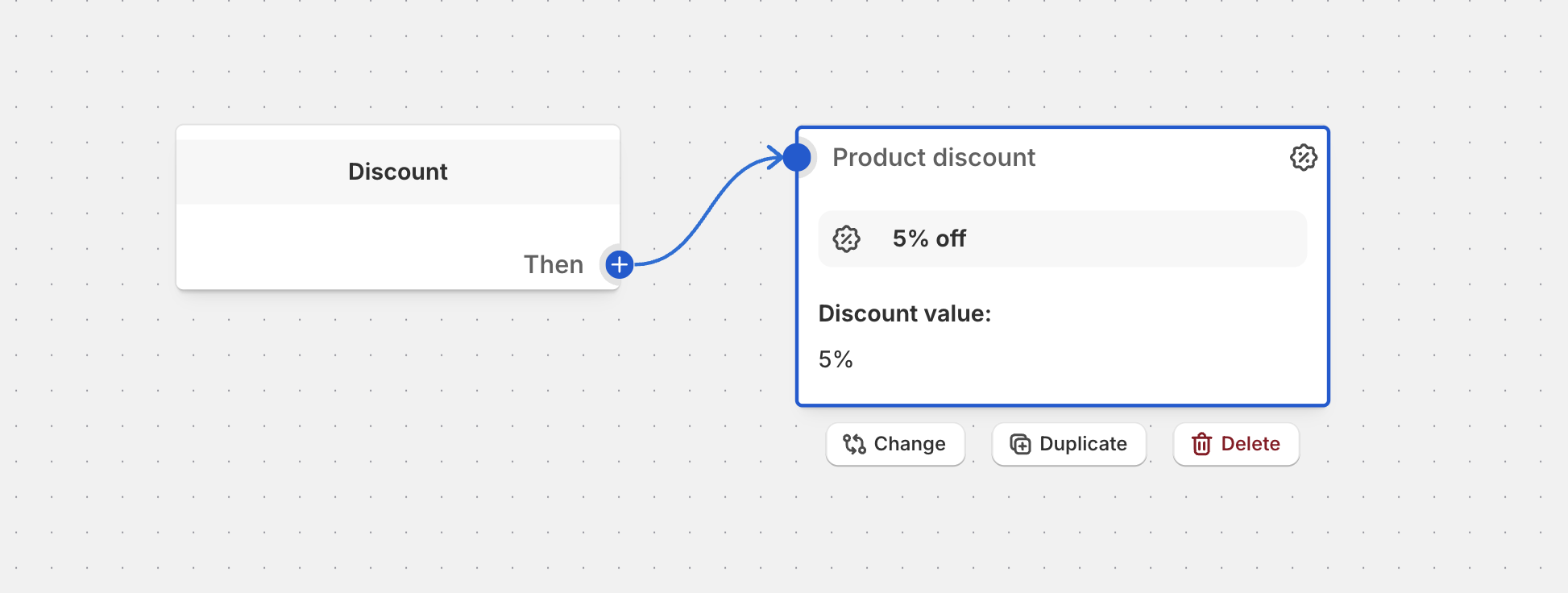
In Function Studio, every function is a flow. You start from the function block (Discount, Payment customization, Validation and so on) and connect conditions and actions to it:
Line groups work like SMART’s, with more ways to combine them:
- Line groups filter cart lines by product, collection, tag, vendor, product type, SKU, variant title, price, compare-at price, selling plan, metafield or line item property. A group can build on another group, exclude one, cap how many items it holds, and set the order of its items.
- Aggregation blocks (Count Items, Sum Values, Max) work across groups. For example: “count items from the Sale collection” or “add up the price of items in the bundle group”.
- Calculated fields, such as the cart subtotal after other discounts, let you set gift and spend thresholds correctly when several discounts stack.
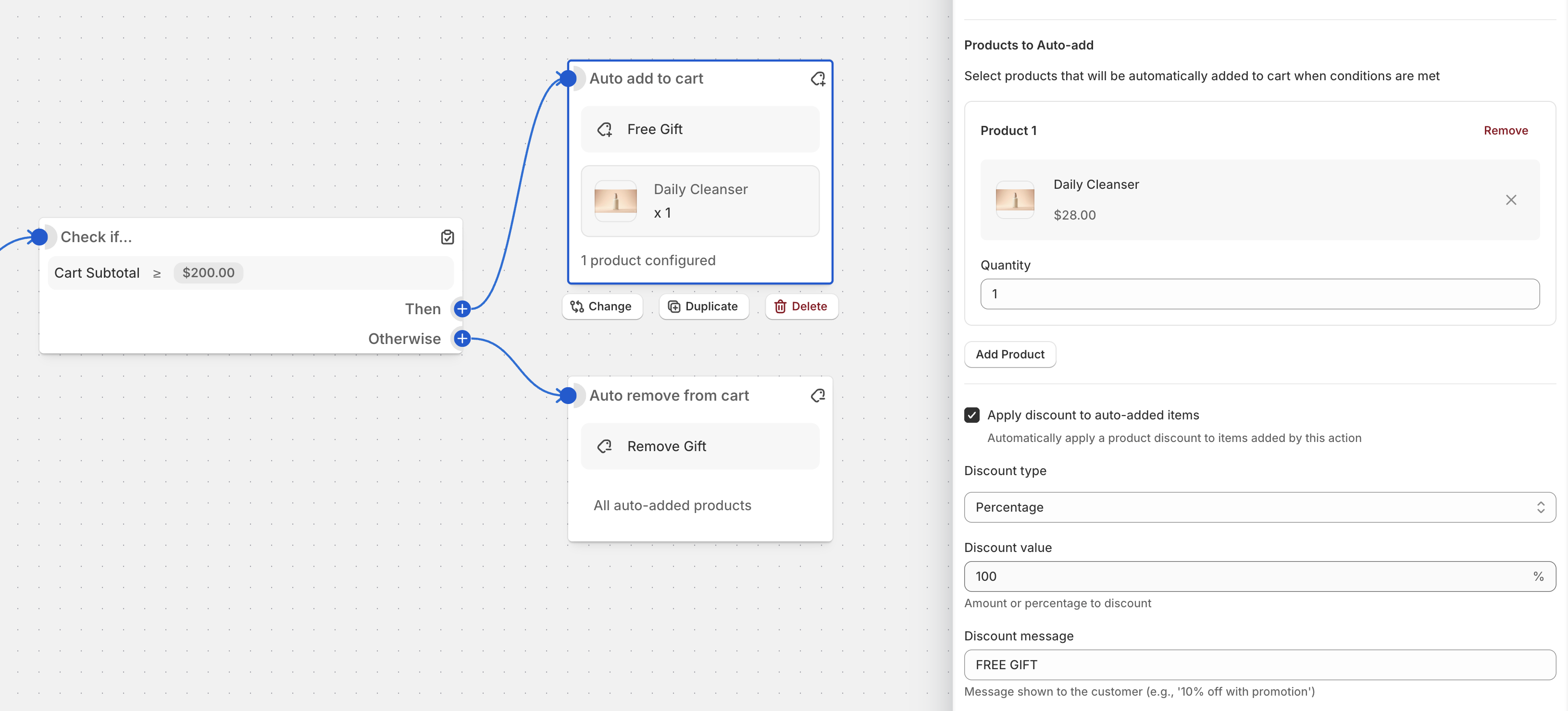
- Bundle, tier and Free Gift blocks package common patterns: fixed-price and component bundles, quantity and spend tiers, and gift-with-purchase rules.
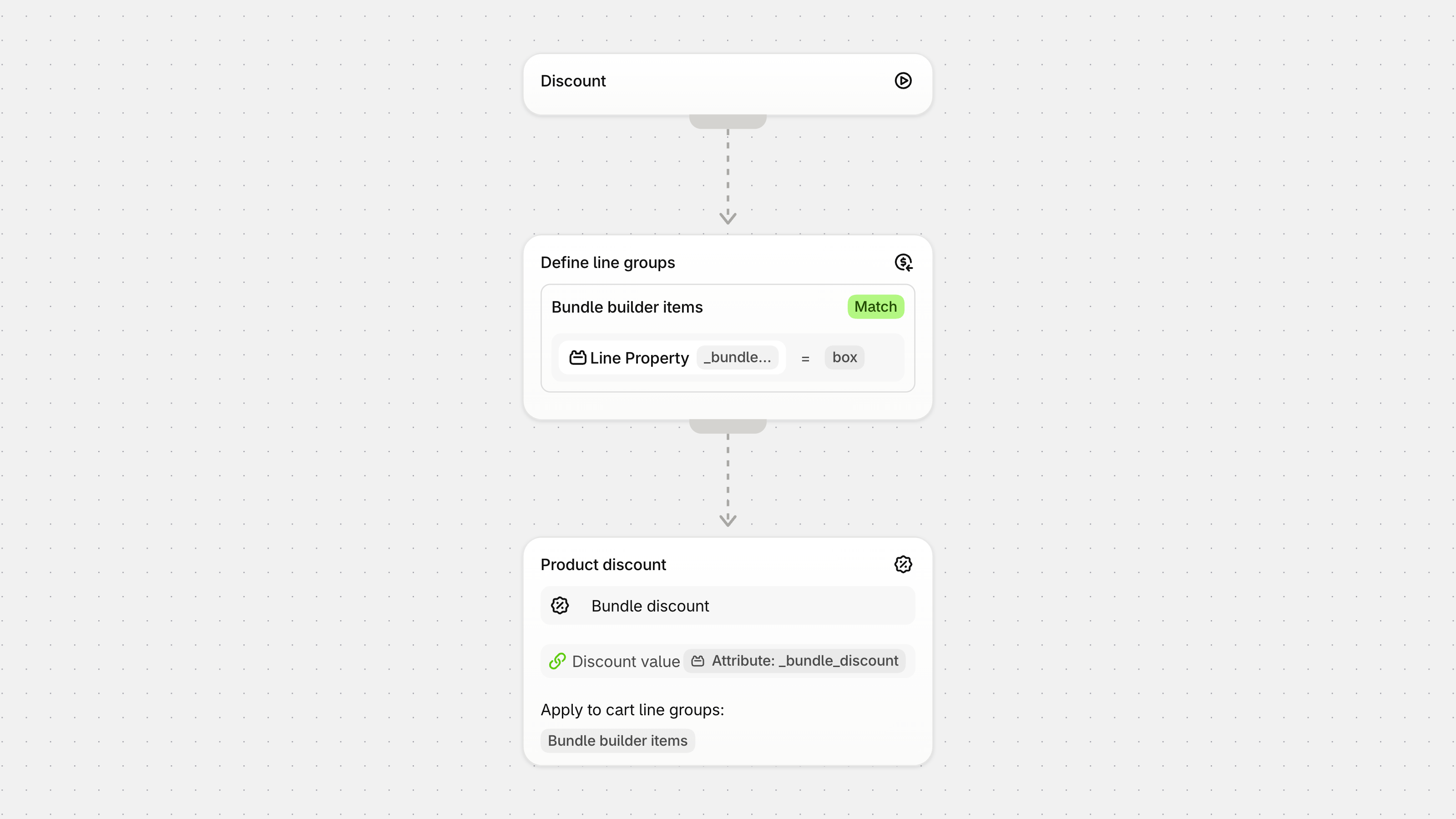
- Expressions handle cases where a dropdown isn’t enough. You build them in a visual expression editor:
Data-driven discounts: the biggest difference
Both apps can use metafields and line item properties to decide which lines get a discount. Only Function Studio can also use them to decide how much.
- Conditions can check product, variant and customer metafields, cart attributes (including JSON attributes and UTM parameters) and line item properties. One function can read more than one metafield key and more than one line item property key. The exact number depends on the function input. The editor warns you when a flow needs more than the input can read.
- Linked fields let any discount value, quantity, message or tier threshold come from a metafield, cart attribute, line item property or the output of an upstream block. This allows:
- Per-product discounts: each product stores its own percentage or flash-sale price in a metafield.
- App-driven discounts: a bundle builder writes line item properties, and the discount reads them.
- Computed discounts: a Count or Sum block feeds its result straight into the discount value.
JSON metafields are supported down to individual subfields. See the metafield discount docs. Metafield support and JSON cart attributes are part of the Advanced plan.
Some promotions that show the difference:
| Promotion | SMART Functions Creator | Function Studio |
|---|---|---|
| Each product stores its own discount percentage in a metafield | Possible with one rule per percentage value; the rules share one function’s size budget | One linked field reads the value for each line |
| Gold members (customer metafield) get 20% off products flagged by a product metafield | Customer metafield conditions not documented | Two metafield conditions in one flow |
| A bundle builder writes two line item properties: a bundle ID and a tier | One line item property key per function | Both properties in one flow |
| The cart subtotal after other discounts decides the gift threshold | Not documented: conditions compare the cart total and subtotal | Calculated field: subtotal after other discounts |
If your promotions are fixed rules (“20% off this collection for wholesale customers”), SMART covers them well, and this section matters less.
Testing before you go live
SMART Functions Creator has no in-app tester. Its FAQ tells you to turn the rule on and then check out with a real cart, because inactive rules don’t run. Its support team also offers to check rules with you.
Function Studio’s in-app cart tester runs a flow against a cart before you activate it. It traces each condition, so you can see why a discount did or didn’t apply. The tester is part of the Advanced plan. For a Black Friday rule on a busy store, testing without going live is a real advantage.
AI, the MCP server and the REST API
SMART Functions Creator has no AI for merchants. Its support team drafts rules with you in the app chat, on every plan. Many reviewers say that is what they value most.
Function Studio includes an AI assistant from the Standard plan ($39 per month). There are no credits to buy. Describe a promotion in plain language and it builds or edits the flow. Function Studio also runs a remote MCP server, so you can connect Claude, Codex or another MCP client. The AI searches your catalog, builds the flow, tests it against a sample cart and saves it as an inactive draft for you to review and activate in the app. You choose its permissions when you connect, and each connection is tied to one staff account. The MCP server is included from the Standard plan.
Function Studio also has a REST API from the Advanced plan ($69), for your own systems instead of an AI client: an ERP, a PIM, a CI job, or an HTTP step in Zapier, Make or n8n. You send a function’s logic in the same JSON format that Export logic makes in the editor, and the title, code and settings as separate fields. The API covers all function types and promotions: list, read, create (always inactive), change, activate, schedule, validate, test against a sample cart and read promotion analytics. Each integration gets its own access token with scoped permissions, an optional expiry and an optional IP allow list. A request log shows every call. See the REST API docs.
We couldn’t find an API, an MCP server or an automation connector in SMART’s help center (checked October 23, 2026).
Neither app has a code editor. SMART’s App Store text mentions a “script editor”, but its help center describes only the rule builder. It says the app doesn’t run merchant-written code, because Shopify App Store rules don’t allow public apps to do that.
Runtime
Every Function Studio function runs as compiled Rust. Your flow is configuration that Rust functions read. Shopify’s Optimize instruction counts guide explains why this matters. Functions run during cart and checkout. Every instruction adds latency. Rust is usually the best way to keep instruction counts low on large carts and with complex logic. SMART doesn’t publish which language its functions use.
What each app can build
| Shopify Function area | SMART Functions Creator | Function Studio |
|---|---|---|
| Product, order and shipping discounts | Yes (a shipping discount reduces a rate; no fixed final rate) | Yes |
| Tiered, volume, BOGO, Buy X Get Y | Yes | Yes |
| Bundle discounts (incl. fixed final price) | Yes | Yes, dedicated bundle blocks |
| Discount code rejection | No (the editor doesn’t expose it) | Yes, with wildcard rejection rules |
| Payment customizations (hide, reorder, rename) | Yes | Yes |
| B2B payment terms | Not documented | Yes (net terms, fixed dates, deposits) |
| Delivery customizations (hide, reorder, rename) | Yes | Yes |
| Cart and checkout validation | Yes | Yes |
| Cart transforms (expand, merge, update lines) | Yes (update on Shopify Plus and development stores) | Yes, as flow blocks |
| Conditions on product and variant metafields | Yes (one product and one variant key, metafield input only) | Yes |
| Conditions on customer metafields | Not documented | Yes |
| Conditions on cart attributes | Yes | Yes, including JSON attributes |
| Conditions on line item properties | Yes (one key per function, Attribute input only) | Yes |
| Discount values from metafields, attributes or properties | No | Yes, using linked fields |
| Aggregations (count, sum, max) and expressions | No | Yes |
| In-app cart tester | No | Yes (Advanced) |
| Version history and restore | Yes, every plan (plus JSON export; active dates aren’t restored) | Yes, Timeline with restore (Advanced and up) |
| Add gifts to the cart automatically | Not in this app | Yes (Advanced) |
| Upsells and storefront widgets in the same app | No, separate SMART apps | Yes (Advanced) |
| AI assistant and MCP server | No | Yes (Standard and up) |
| REST API for your own systems and automation tools | Not documented | Yes, flows as JSON (Advanced and up) |
| Function runtime | Not published | Compiled Rust (WebAssembly) for every function |
Both apps cover the core discount, payment, delivery, validation and cart transform APIs. SMART’s strength is that every feature it has is on its cheapest plan, with clear docs. Function Studio’s documented advantages are data-driven discount values, aggregations and expressions, and the cart tester. It also adds code rejection, B2B payment terms, AI tools and storefront promotions in the same app.
Storefront and checkout promotions: one app or a family of apps
Discounts are only half of a promotion. Shoppers also need to see the offer.
SMART Functions Creator has no storefront widgets. E-TRADE PARTNER covers that with other apps, and the two most relevant are listed as free:
- SMART Bundles Volume Discounts (listing, 5.0 from 483 reviews) adds bundles, quantity breaks, BOGO, free gifts and upsell add-ons on product pages.
- SMART Checkout Rules & Upsells (listing, 5.0 from 814 reviews) adds checkout blocks such as banners, post-purchase upsells, and its own payment, shipping and validation rules.
These are separate apps with their own discount settings, so a promotion’s widget and its Functions Creator logic live in different places. If one of these free apps already covers your rule, you may not need Functions Creator at all.
Function Studio builds this into the same app on the Advanced plan:
- In-cart upsells, plus Upsell Buttons on product pages, with an optional discount on the add-on.
- Gift with purchase: a gift selector where shoppers pick a free gift, with automatic add and removal.
- A visual widget editor: drag-and-drop building blocks, layouts and color themes for storefront and checkout.
- Per-promotion analytics: views, clicks, adds, orders and AOV lift.
Here is the monthly cost of one common setup: tiered discounts plus a gift with purchase shown on the storefront and at checkout. List prices, October 21, 2026:
| Setup | SMART apps | Function Studio |
|---|---|---|
| Discounts, gift with purchase, checkout blocks | Functions Creator Lite $19.99 or Pro $39.99 + SMART Bundles (free) + SMART Checkout (free) = $19.99 or $39.99 | Advanced $69 |
SMART is cheaper for this setup. Function Studio’s extra $29 to $49 per month buys one app for the logic and the widget that promotes it, a gift selector that adds and removes the gift, per-promotion analytics, and the cart tester and metafield-driven values from the sections above.
Support and maintaining functions
The two apps take different approaches to who builds and changes the logic.
SMART Functions Creator relies on its support team. Live chat and email are on every plan, and the main theme in its reviews is a support team that builds or checks rules for the merchant. If you want to describe a rule once and have someone set it up, that is a real strength, and it starts at $19.99. Version history with restore and JSON export are also on every plan.
Function Studio relies on tools, so your own team can change promotions every week without waiting for anyone:
- Readable logic: conditions, groups and discounts are blocks you can follow on the canvas. For complex promotions, a flow is usually easier for non-technical people to read and change.
- Form view: pin key blocks, such as a threshold or a discount percentage, so teammates can edit them as simple form fields without opening the flow editor.
- Cart tester with tracing: check a change against a cart before it goes live.
- AI assistant and MCP server: describe a change and review the draft.
- REST API: let your own systems update promotions, for example a weekly price list from your ERP.
- Version history: a Timeline records every change across functions and promotions, with restore (Advanced and up).
Function Studio support is by email on Standard, chat and email on Advanced, and priority support, a dedicated developer and a partner Slack on Plus. So if live chat on the cheapest plan matters to you, SMART is the better choice.
Migrating from Shopify Scripts
Neither app converts Ruby Scripts automatically.
- SMART Functions Creator is built for this. Its Scripts guide maps each script type to a function type, and its support team helps you rebuild the rules on every plan.
- Function Studio rebuilds Scripts as visual flows. You can run them through the cart tester before you activate them, and the Plus plan includes hands-on migration help from the team.
Pricing
As listed on the Shopify App Store on October 21, 2026 (USD per month):
| SMART Functions Creator | Function Studio | |
|---|---|---|
| Free | Development stores | Development stores |
| Entry plan | Lite $19.99: every feature, up to 2 active functions | Standard $39: flow builder, validations, payment and delivery, tiered/BOGO/bundle discounts, GWP, cart transforms, AI assistant, MCP |
| Mid plan | Pro $39.99: every feature, unlimited active functions | Advanced $69: metafields, expressions, translations, POS features, cart tester, currency conversion, storefront and checkout promotions, REST API |
| Top plan | None | Plus $199: function versioning, Scripts migration help, dedicated developer, partner Slack |
| Yearly | 20% off ($191.88 or $383.88 per year) | 17% off Advanced, 16% off Plus ($690 or $1,999 per year) |
| Trial | 7 days | 3 days on Standard, 5 on Advanced, 7 on Plus |
A few details:
- SMART’s paid plans started on October 7, 2026. Stores that installed the app before that date keep every feature for free. A reinstall counts as a new install. The app was free until then. At that time it had about 126 reviews, so most of its reviews describe the free app.
- On SMART’s Lite plan, a discount scheduled to start later counts as one of the 2 active functions.
- Function Studio’s Advanced plan lists a limit of 25 active functions. SMART Pro has no app limit, only Shopify’s own limits.
- SMART’s own comparison page (September 2026) lists older Function Studio prices. The figures in this article are from the App Store on October 21, 2026.
SMART is cheaper at every level, and its entry plan already has every feature it offers. What Function Studio adds for the higher price is the depth this article describes: data-driven values, aggregations and expressions, the cart tester, AI tools and storefront promotions in one app.
Which one should you choose?
SMART Functions Creator is likely the better fit if:
- Price comes first: $19.99 for up to 2 active functions, $39.99 for unlimited, every feature on both plans. If you installed before October 7, 2026, it’s free.
- You want support to build your rules with you in live chat, on every plan.
- Your promotions are fixed rules: set percentages, tiers, BOGO and bundles that match on one metafield key or one line item property.
- You’re replacing Shopify Scripts on a Basic, Grow or Advanced store and want a direct mapping from script types to functions.
- You’re happy to use the free SMART companion apps for bundles, gifts and checkout upsells.
Function Studio is likely the better fit if:
- Your discounts depend on store data as values, not only as conditions: per-product percentages from metafields, line item property values from a bundle builder, or a Count or Sum result fed into the discount.
- You need several metafield or line item property keys, customer metafields, aggregations or expressions in one function.
- You want to test a rule before it goes live, with a trace of each condition.
- You want code rejection rules or B2B payment terms alongside discounts.
- You want an all-in-one app: upsells, a gift selector with auto-add, checkout widgets and promotion analytics in the same app as your discount logic.
- Your own team will maintain the functions: complex promotions stay visual flows, which are usually easier for non-technical people to manage, teammates edit pinned blocks in Form view, and version history lets you restore earlier versions.
- You want an AI assistant and an MCP server for Claude, Codex or other AI clients, included from the $39 Standard plan.
- You want to manage functions and promotions from your own systems through a REST API (Advanced plan), with the same flow JSON that the editor exports.
- Checkout speed matters with large carts or complex rules: every function runs as compiled Rust.
Both apps have free plans for development stores, so the best test is to build the same promotion in each and compare. You can install Function Studio to start.