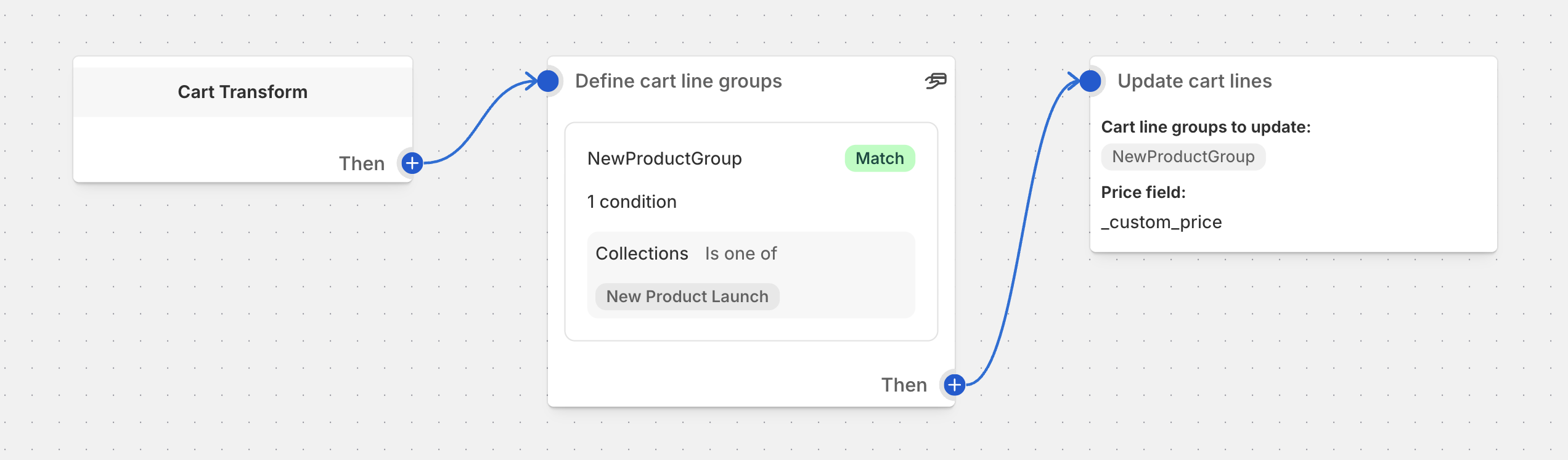
Cart Transform: Update Lines Operation
Modify the price, title, and image of cart line items
Overview
The Update Lines block modifies the properties of cart line items — including their price, title, and image. Changes appear immediately in the customer’s cart.
- Dynamic pricing — apply custom prices based on metafields, attributes, or mapping rules
- Product customization — change titles and images based on customer selections
- Personalization — display customized product information in the cart
- Conditional pricing — apply different prices based on product attributes
Warning
Update operations are supported only on Shopify Plus stores.
Two Methods
The Update Lines block supports two configuration methods:
- Manual configuration — set price, title, and image individually using static values or linked fields
- Attribute-based configuration — load all values dynamically from a single JSON cart line attribute
Setup
Open your cart transform function
Navigate to the function you want to edit in Function Studio
Add the Update Lines block
Click Add Action and select Update Lines from the action list
Configure the block
Set the options described in the Settings section below
Settings
Cart Line Groups
Required
Select which groups of cart lines should be updated. Groups must be defined earlier in your function using a Define Cart Line Groups block.
Price Mapping
Optional
Select a mapping variable to apply dynamic prices based on mapping rules. When selected, this overrides any static or field-based price settings.
This dropdown shows output variables created by Variant Price Mapping blocks placed earlier in your function. When a mapping is selected, per-unit prices are looked up from a CSV-format metafield at runtime.
If no Variant Price Mapping blocks exist in your function, the UI shows “No mapping variables available.”
Tip
To use price mapping, add a Variant Price Mapping block before the Update Lines block. The mapping block reads pricing data from a metafield and makes it available as a variable.
Load All Fields from Attribute
When enabled, price, title, and image are all read from a JSON attribute on each cart line instead of being set individually. The individual field settings below are hidden.
See Attribute-Based Configuration for the JSON format.
Attribute Key
Shown when Load All Fields from Attribute is enabled
The cart line attribute key to read data from. Defaults to _update.
Load Price from Field
Shown when not loading from attribute
When enabled, the price value is read from a metafield, cart attribute, or other field instead of using a fixed value. The fixed price input is replaced with a field selector.
Supported field sources:
- Product Metafields — read price from a product-level metafield
- Variant Metafields — read price from a variant-level metafield
- Cart Line Attributes — read price from a line item property
- Standard Fields — use a built-in numeric field (e.g., quantity, unit price)
Price
Shown when not loading from attribute or field
Set a fixed price per unit for all items in the selected groups. Leave empty to keep the original price.
Title
Optional · Shown when not loading from attribute
Override the product title shown to customers. Leave empty to keep the original title.
Image
Optional · Shown when not loading from attribute
Select a custom product image. Leave empty to keep the original image.
Attribute-Based Configuration
For maximum flexibility, load all fields from a single cart line attribute containing a JSON object.
JSON Structure
{
  "price": "34.56",
  "title": "Custom Product Title",
  "image": "https://cdn.shopify.com/path/to/image.png"
}
All fields are optional — omit any field to keep its original value.
price
Optional
New price per unit. Must be a string representation of a decimal number (e.g., "29.99").
title
Optional
New display title for the cart line.
image
Optional
New image URL for the cart line.
Setting the Attribute
In Product Forms (Liquid Templates)
<input type="hidden" name="properties[_update]" value='{"price":"34.56","title":"Custom Product"}'>
Via Ajax Cart API
{
  "id": "12345",
  "qty": 1,
  "properties": {
    "_update": '{"price":"34.56","title":"Custom Product","image":"https://example.com/image.png"}'
  }
}
Through apps or scripts — set the property when adding items to cart programmatically. Useful for product configurators and customization tools.
Examples
Example 1: Fixed Price Override
Apply a promotional price to all items in a specific collection.
Create a cart line group
Add a “Define Cart Line Groups” block with group name PROMO_ITEMS matching products in the “Summer Sale” collection
Add the Update block
Select Update Lines, set Cart Line Groups to PROMO_ITEMS, and enter 19.99 as the Price
Result
All items in the “Summer Sale” collection are repriced to $19.99
Example 2: Price from Variant Metafield
Use a custom price stored in a variant metafield.
Set up metafields
Add a variant metafield custom.promo_price (type: number_decimal) with different values per variant
Create the group and block
Add a “Define Cart Line Groups” block for the target products, then an “Update Lines” block
Enable field-based pricing
Turn on Load price from field, select Variant Metafield, and choose custom.promo_price
Result
Each variant uses its own promotional price from the metafield
Example 3: Dynamic Customization with Attributes
A customer personalizes a product with custom text and image.
Set the attribute on add-to-cart
Your theme or app sets _update property with JSON: {"price":"45.00","title":"Personalized Mug - Sarah","image":"https://cdn.shopify.com/generated/sarah-mug.png"}
Create the group
Add a “Define Cart Line Groups” block with group name PERSONALIZED matching items with the _update attribute
Enable attribute loading
In the Update Lines block, turn on Load all fields from attribute with attribute key _update
Result
Cart line displays custom title, image, and price based on the personalization
Example 4: Price Mapping from Variant Metafield
Use a Variant Price Mapping block to apply dynamic pricing from a CSV metafield.
Add a Variant Price Mapping block
Place it before the Update Lines block. Configure it to read from the variant metafield containing pricing data
Add the Update block
In the Price Mapping dropdown, select the mapping variable created by the Variant Price Mapping block
Result
Per-unit prices are dynamically looked up from the metafield CSV data at runtime, overriding static price settings
Best Practices
Pricing Strategy
- Use metafield-based pricing when different products need different prices without creating separate functions
- Use Price Mapping when you need quantity-based or market-based pricing tiers from a CSV metafield
- Set prices as string values in attribute JSON (e.g.,
"29.99"not29.99)
Attribute-Based Loading
- Use a consistent attribute key across your store (the default
_updateworks well) - Validate JSON format before setting the attribute — invalid JSON is silently ignored
- Only include fields you want to change — omit fields to keep original values
Customer Experience
- Use meaningful titles so customers understand any price changes
- Provide updated images when the visual appearance of the product changes
- Test the checkout experience with updated lines
Important Considerations
Plan Requirements
- Update operations require Shopify Plus
- The block shows a warning banner if used on a non-Plus store
Cart Behavior
- Updated values appear immediately in the customer’s cart
- Original product data is preserved in Shopify — only the cart presentation changes
- Cart totals reflect the updated pricing
- Leave fields empty to keep original values
Price Mapping Precedence
- When a Price Mapping variable is selected, it overrides both static prices and field-based prices
- If the mapping doesn’t find a match for a given line, the line’s price is not changed
Function Flow Requirements
- Cart line groups must be defined before the Update Lines block
- Variant Price Mapping blocks must be placed before the Update Lines block if using price mapping
- Updates apply to the current cart session
Troubleshooting
Updates Not Applying
- Check your groups — make sure cart line groups are defined before the Update Lines block
- Verify plan — Update operations require Shopify Plus
- Check for empty values — empty fields are intentionally ignored (original value kept)
Price Not Changing
- Check Price Mapping — if a mapping variable is selected, it overrides static and field-based prices. Try setting the mapping dropdown to “No mapping” to test
- Verify field source — when using “Load price from field,” ensure the metafield exists and has a numeric value
- Check attribute format — when using attribute-based loading, price must be a string (e.g.,
"29.99")
Attribute-Based Loading Not Working
- Check JSON format — ensure the attribute value is valid JSON
- Verify attribute key — confirm the key matches what’s configured (default:
_update) - Check attribute is set — verify the property is actually present on the cart line
- Test individual fields — try setting only
pricefirst to isolate issues