Map Value Action
Look a key up in a JSON map and store the found value in a variable. Use it to turn a ZIP code, a customer tier or any other value into a status that later blocks can act on.
Overview
The Map value action looks a key up in a JSON object and stores the value it finds in a variable. Conditions and blocks later in the flow read that variable like any other value.
Use this action to:
- Turn the delivery ZIP code into a region status (
WAITLIST,PRESALE,ACTIVE) and block or allow products by that status - Map a customer tier to a discount percentage
- Map a province or country code to a shipping zone
- Keep the lookup table in a metafield that Shopify Flow or another app updates, so the function does not change when the table changes
Available for Function Types
- Validation
- Payment Customization
- Discount
Setup
Add the action
Click Add Action and select Map value
Name the variable
Enter the name that later blocks use to read the found value
Set the key
Enter the value to look up, or link it to an input field, a variable, a metafield or an attribute
Set the map
Link a JSON metafield or a JSON attribute, or enter the JSON object as text
Select the key match
Keep Exact, or select Prefix when the key can be longer than the map keys
Add a fallback
Turn on the default value if no map key can match
Use the result
Refer to the variable in conditions or in expressions on later blocks
Settings
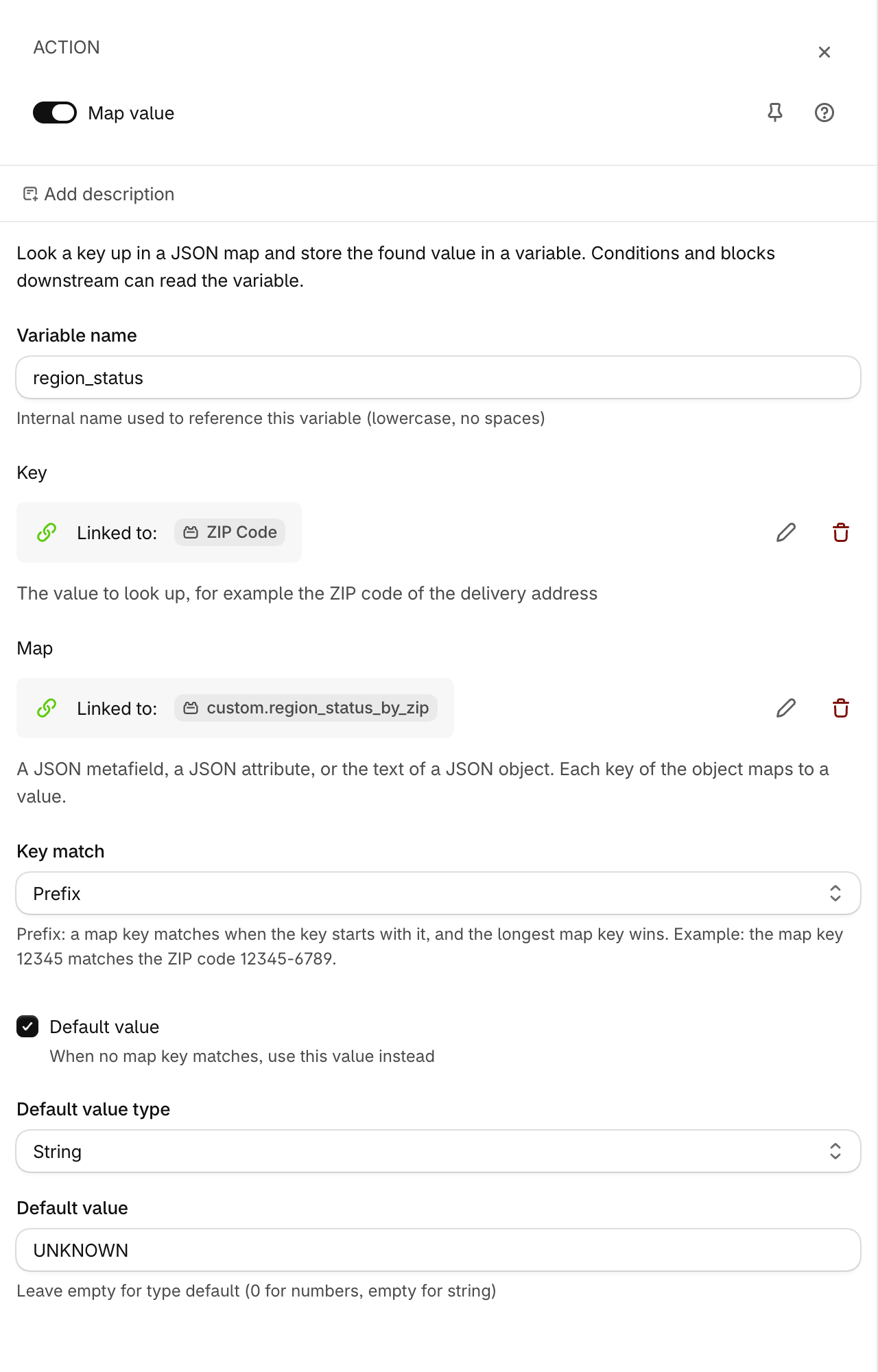
Variable name
Required
The internal name that identifies this variable. Use lower case letters and no spaces.
Warning
Give each variable a different name. A second action with the same name replaces the first value.
Key
Required
The value to look up in the map. Enter a static text, or link the key to an input field (for example the ZIP code of the delivery address), an upstream variable, a metafield, an attribute, or an advanced expression.
Map
Required
A JSON object. Each key of the object maps to a value:
{"12345": "WAITLIST", "94105": "ACTIVE"}
Link a JSON metafield or a JSON attribute, or enter the JSON object as text. The action reads the whole JSON object. A metafield that another app, such as Shopify Flow, keeps up to date lets you change the map without a change to the function.
Note
A function cannot read a metafield value that is larger than 10,000 bytes. Keep the map smaller than this limit.
Key match
Optional
- Exact (default) — the map key must be equal to the key
- Prefix — the map key matches when the key starts with it. When more than one map key matches, the longest map key wins
With Prefix, a map of 5-digit ZIP codes also serves ZIP+4 codes: the map key 12345 matches the ZIP code 12345-6789.
Default value
Optional
Turn this on to store a value when no map key matches, or when the key or the map is empty. Without a default value the variable is empty, and a condition on an empty variable is false.
Default value type
The type of the fallback value. Select String, Integer, or Decimal.
Default value
The fallback value to store. Leave it empty for the default of the type, which is 0 for numbers and empty text for a string.
How It Works
The block runs one time per function run, before the blocks that follow it:
- It reads the key: the linked field, variable, metafield, attribute or expression, or the static text
- It reads the map as one JSON object
- With Exact, it takes the value whose key is equal to the key. With Prefix, it takes the value of the longest map key that the key starts with
- It stores the found value in the variable. A string value stays a string, a number stays a number
- When nothing matches, it stores the default value, or leaves the variable empty
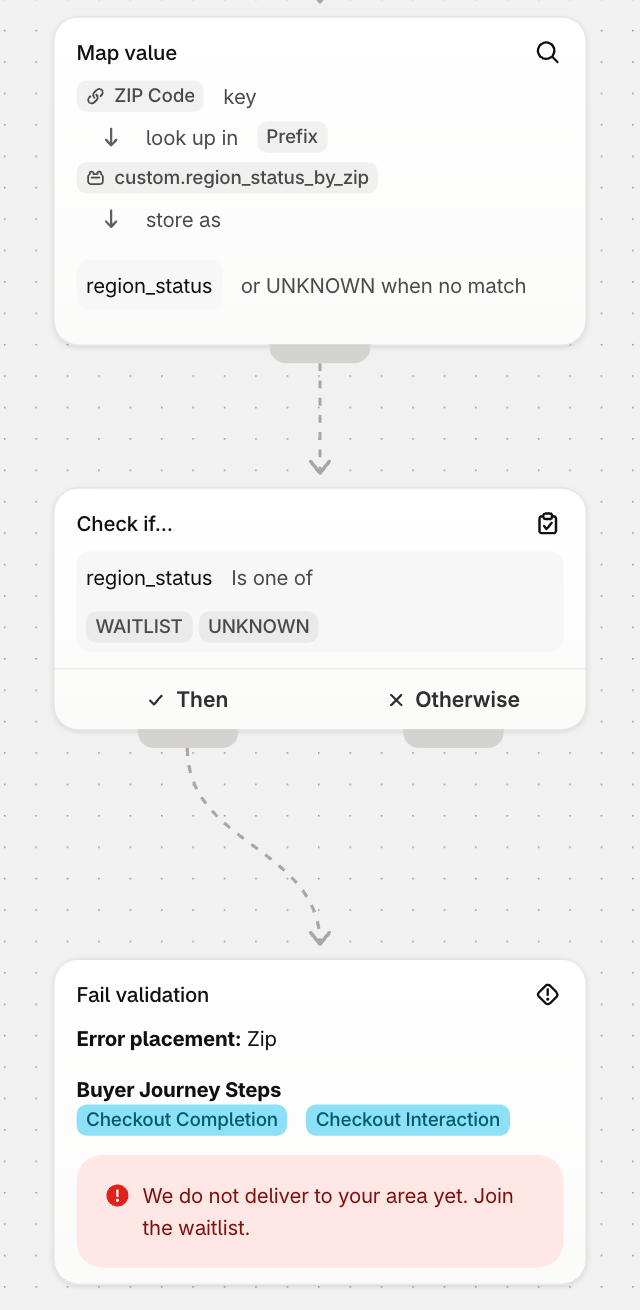
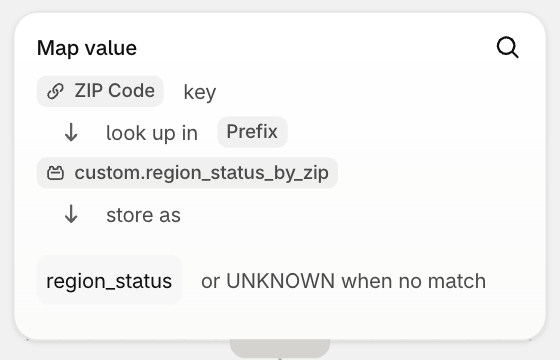
The flow editor shows the block as a pipeline: the key, the map it looks the key up in, and the variable it stores the value as.
Examples
Region status from the delivery ZIP (Validation)
You keep the status of each delivery region in a shop metafield of the JSON type, and you want to block checkout for regions on the waitlist.
Add the action
Add a Map value action with the variable name region_status
Link the key
Link the Key to the ZIP Code of the delivery address
Link the map
Link the Map to the shop metafield with the value {"12345": "WAITLIST", "94105": "ACTIVE"}
Match by prefix
Select Prefix as the key match, so that 12345-6789 also finds 12345
Set the fallback
Turn on the default value and enter UNKNOWN, so a ZIP code that is not in the map is blocked too
Block the checkout
Add a condition region_status is one of WAITLIST, UNKNOWN, and connect a Fail validation action to its Then branch
Result
A buyer with the ZIP code 12345-6789 gets WAITLIST and the checkout is blocked. A buyer with 94105 gets ACTIVE and the checkout continues
Discount percentage by customer tier (Discount)
A customer metafield holds the tier, and a JSON map turns the tier into a percentage.
Add the action
Add a Map value action with the variable name tier_pct
Link the key
Link the Key to the customer metafield that holds the tier, for example gold
Enter the map
Enter the map as text: {"gold": 20, "silver": 10}
Set the fallback
Turn on the default value, select Integer and leave the value empty, so customers without a tier get 0
Use the value
In the discount block, link the discount value to the variable tier_pct
Result
Gold customers get 20% off, silver customers 10%, and everyone else no discount
Important Considerations
Note
A linked key or map needs a function input that reads the delivery address and the metafield together. The editor picks that input for you when you save. A shop metafield in the same function as the delivery address needs the Advanced plan.
Tip
Test the block with the Cart Tester: set a delivery address with the ZIP code and a sample value for the shop metafield, then run the function to see the stored value and the result of the conditions.
Troubleshooting
The variable is always the default value
- Check that the map is a JSON object, with the keys and the text values in double quotes. The panel shows an error under the Map field when the text is not valid JSON
- Check the key match: with Exact, the key
12345-6789does not find the map key12345. Select Prefix - Check that the linked metafield has a value on the shop, product or customer the function reads
The condition after the block never matches
- A condition on an empty variable is false. Turn on the default value so the variable always holds a value you can test for
- Compare text values with Is one of or Equals and numbers with the number operators. The found JSON value keeps its type